EHS on Nokia SR OS: Why Event-Driven Automation Needs pySROS
Understanding the Event Handling System and how pySROS turns router events into automated action
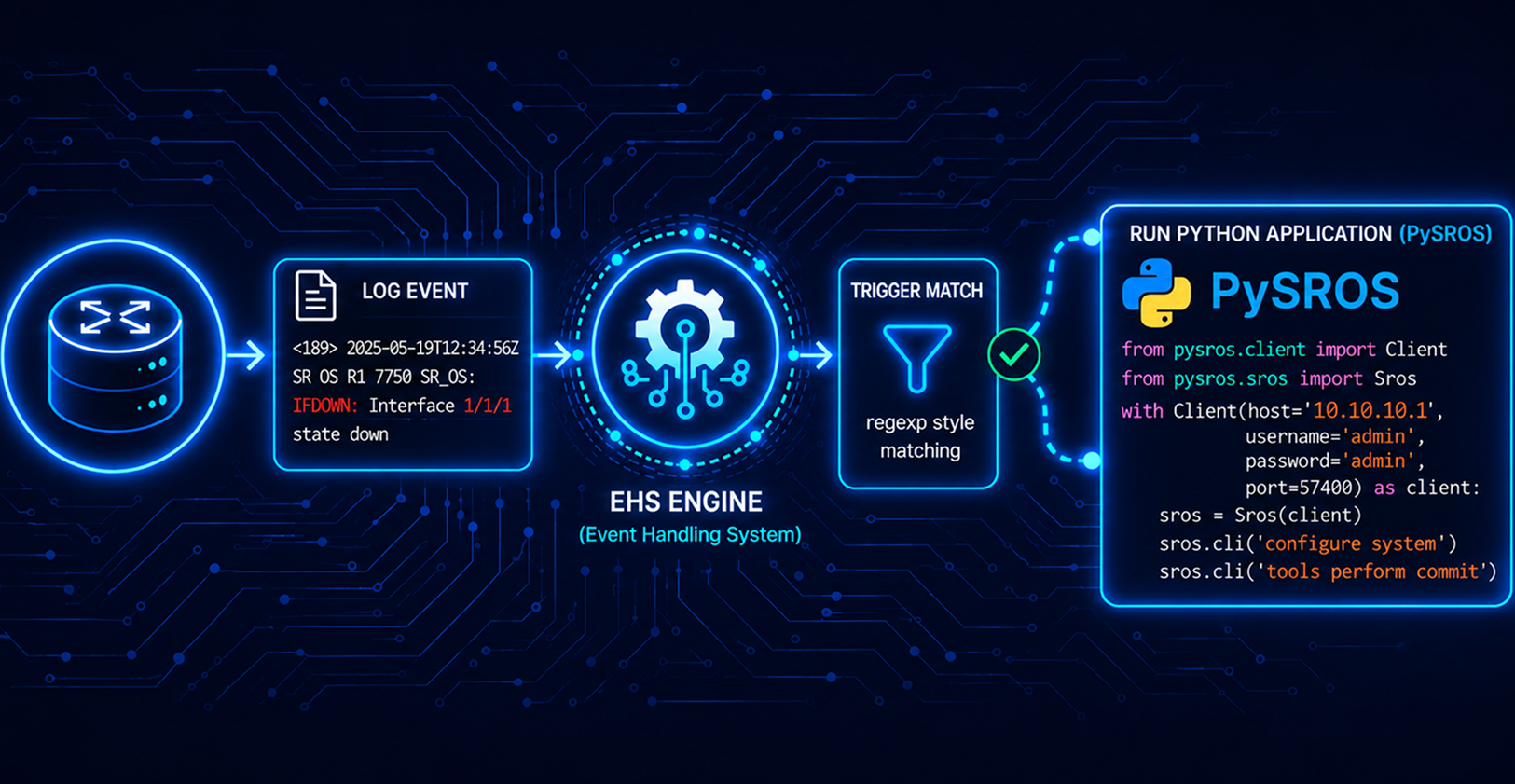
In our previous article, Event Handling System (EHS), we discussed how we can use MD-CLI to automate reactive tasks on a router.
This article focuses on how pySROS can be utilized similarly, and it also highlights its flexibility.
The Problem: Routers Generate Events, Not Actions
Every Nokia SR OS device is constantly generating events: a card goes down, a BGP session flaps, a configuration gets committed, an interface state changes. All of these events are logged. A human operator monitoring that log can react by pulling a tech support dump, notifying a team, getting a backup. An operator isn't monitoring every device, every log, all the time. At 3 am, on a device with no one logged in , a major event happens and nothing happens unless a mechanism has been built ahead of time to act on it automatically.
This is the gap the Event Handling System (EHS) exists to close: a way to tell SR OS "when event X happens, run this" without needing an external poller, a human, or a separate monitoring stack to notice and react.
What EHS Actually Is
EHS is SR OS's native mechanism for binding a specific event (identified by an application ID and event ID) to a script that runs on-box the moment the event occurs. It's configured under configure log event-handling, where a handler ties an event to a script registered under script-control
Two things make this different from typical "watch the log and react" tooling:
It's local; the reaction happens on the router itself, with no dependency on a management station being reachable at the time.
It's immediate; There is no polling interval to wait out; the script runs at the moment SR OS raises the event.
Where pySROS Fits In
EHS defines when a script runs. pySROS is what makes the script itself useful. pySROS is Nokia's Python management interface for interacting with SR OS's model-driven datastore, giving an on-box script the same structured, YANG-modelled access to router state and configuration that an off-box automation tool would get over NETCONF or gNMI.
EHS plus pySROS moves the first layer of reaction onto the device itself. The off-box automation stack, like CI/CD pipelines, orchestration platforms, and monitoring dashboards, still has an important job to do, but it's no longer the only thing standing between "something happened" and "something was done about it."
Getting Started
Use Case :
You are a network engineer, and you have been tasked with automatically backing up router configurations to an external system or storage every time configurations are made.
In this use case, we will configure the SR OS nodes to trigger backups using the SR OS Event Handling System (EHS) every time a successful commit is issued.
SR OS natively supports writing the configuration files to multiple locations by using the primary, secondary, and tertiary directives in the BOF . We are keeping our example simple, and we will write the configurations to an extra compact flash (CF1) on the router.
Configure the location of the Python script :
configure {
        python {
            python-script "ehs" {
                admin-state enable
                urls ["cf3:ehs.py"]
                version python3
            }
        }
    }
Create a script-policy :
 configure {
        system {
            script-control {
                script-policy "ehs" owner "admin" {
                    admin-state enable
                    results "cf3:/ehs/"
                    python-script {
                        name "ehs"
                    }
                }
            }
        }
    }
Configure a log filter :
configure {
        log {
            filter "config_commits" {
                default-action forward
            }
        }
    }
Configure the event-handling handler :
 configure {
        log {
            event-handling {
                handler "ehs" {
                    admin-state enable
                    entry 10 {
                        admin-state enable
                        script-policy {
                            name "ehs"
                            owner "admin"
                        }
                    }
                }
            }
        }
    }
Configure the log event-trigger :
configure {
        log {
            event-trigger {
                system event mdCommitSucceeded {
                    admin-state enable
                    entry 10 {
                        admin-state enable
                        filter "config_commits"
                        handler "ehs"
                    }
                }
            }
        }
    }
pySROS Script :
from pysros.management import connect
from pysros.ehs import get_event
from pysros.exceptions import SrosMgmtError
import sys


# Configurations
DESTINATION = "cf1:/backups"
CONFIG_FILE = "cf3:/config.cfg"


def main():
    connection = connect()
    trigger_event = get_event()

    system_name = connection.running.get(
        "/nokia-state:state/system/oper-name"
    ).data

    if trigger_event.eventid == 2121:
        system_time = trigger_event.gentime

        # The event specific body, formatted as a string
        event_text = trigger_event.text

        # Build a unique filename: <system_name>_<timestamp>.cfg
        filename = "{}_{}.cfg".format(
            system_name, str(system_time).replace(":", "-").replace(" ", "_")
        )

        # Combine destination path with the configuration filename
        destination = "{}/{}".format(DESTINATION.rstrip("/"), filename)

        command = "file copy {} {} force".format(CONFIG_FILE, destination)

        try:
            connection.cli(command)
        except SrosMgmtError as exception1:
            print("file copy failed:", exception1)
            sys.exit()


if __name__ == "__main__":
    main()
Lets Test :
Make any configurations on a router running MD-CLI and commit the configurations. This will trigger the pySROS script to back up the configuration in your defined destination.
The file will contain :
- The hostname, date, and timestamp
Lets commit :
# commit after configuration changes

[gl:/configure]
A:admin@PE1# commit


# Check logs

==================================================================
Event Log 99 log-name 99
==================================================================
Description : Default System Log
Memory Log contents  [size=500   next event=127  (not wrapped)]

126 2026/09/23 23:59:19.178 UTC WARNING: SYSTEM #2112 Base Configuration Save Succeeds
"Complete configuration file saved in the background to: cf3:\config.cfg"

125 2026/09/23 23:59:19.160 UTC MINOR: SYSTEM #2069 Base EHS script
"Ehs handler :"ehs" with the description : "" was invoked by the cli-user account "not-specified"."

124 2026/09/23 23:59:19.160 UTC WARNING: SYSTEM #2121 Base Commit
"Commit to configure by admin (MD-CLI) from 172.20.20.1 succeeded."

123 2026/09/23 23:59:18.910 UTC WARNING: SYSTEM #2110 Base Configuration Save Succeeds
"Incremental configuration file saved to: cf3:\.commit-history\config-2026-09-23T23-59-18.9Z-162.is"

122 2026/09/22 23:50:23.533 UTC WARNING: SYSTEM #2112 Base Configuration Save Succeeds
"Complete configuration file saved in the background to: cf3:\config.cfg"

121 2026/09/22 23:50:23.513 UTC MINOR: SYSTEM #2069 Base EHS script
"Ehs handler :"ehs" with the description : "" was invoked by the cli-user account "not-specified"."

120 2026/09/22 23:50:23.513 UTC WARNING: SYSTEM #2121 Base Commit
"Commit to configure by admin (MD-CLI) from 172.20.20.1 succeeded."
Check the script-policy:
A:admin@PE1# show system script-control script-policy "ehs" owner "admin"

==================================================================
Script-policy Information
==================================================================
Script-policy                : ehs
Script-policy Owner          : admin
Administrative status        : enabled
Operational status           : enabled
Script                       : N/A
Script owner                 : N/A
Python script                : ehs
Source location              : cf3:\ehs.py
Results location             : cf3:/ehs/
Max running allowed          : 1
Max completed run histories  : 1
Max lifetime allowed         : 0d 01:00:00 (3600 seconds)
Completed run histories      : 1
Executing run histories      : 0
Initializing run histories   : 0
Max time run history saved   : 0d 01:00:00 (3600 seconds)
Script start error           : N/A
Python script start error    : N/A
Last change                  : 2026/09/22 23:19:31  UTC
Max row expire time          : never
Last application             : event-script-python
Last auth. user account      : not-specified

===============================================================================
Script Run History Status Information
------------------------------------------------------------------
Script Run #7
------------------------------------------------------------------
Start time    : 2026/09/23 23:59:19  UTC
End time      : 2026/09/23 23:59:19  UTC
Elapsed time  : 0d 00:00:00             Lifetime      : 0d 00:00:00
State         : terminated              Run exit code : noError
Result time   : 2026/09/23 23:59:19  UTC
Keep history  : 0d 00:56:07
Error time    : never
Source file   : cf3:\ehs.py
Results file  : cf3:/ehs/_20260923-235919-UTC.160730.out
Run exit      : Success
Error         : N/A
Application   : event-script-python     Auth. user ac*: not-specified
* indicates that the corresponding row element may have been truncated.
==================================================================
Check the backed-up configuration :
[/file "cf1:\backups"]
A:admin@PE1# list

Volume in drive cf1 on slot A has no label.

Directory of cf1:\backups

09/23/2026  11:59p      <DIR>          ./
09/22/2026  11:52p      <DIR>          ../
09/22/2026  11:50p               30708 PE1_2026-09-22T23-50-23.Z.cfg
09/23/2026  11:59p               30708 PE1_2026-09-23T23-59-19.Z.cfg
               3 File(s)                  91314 bytes.
               2 Dir(s)            242628493312 bytes free.
Closing Thought
EHS answers a question that off-box automation can't fully solve on its own: what happens the instant something goes wrong, before anything external has a chance to notice? pySROS is what makes that answer more than a canned CLI action; it gives the on-box reaction the same structured, model-driven access to the router that the rest of a modern automation stack already relies on.


