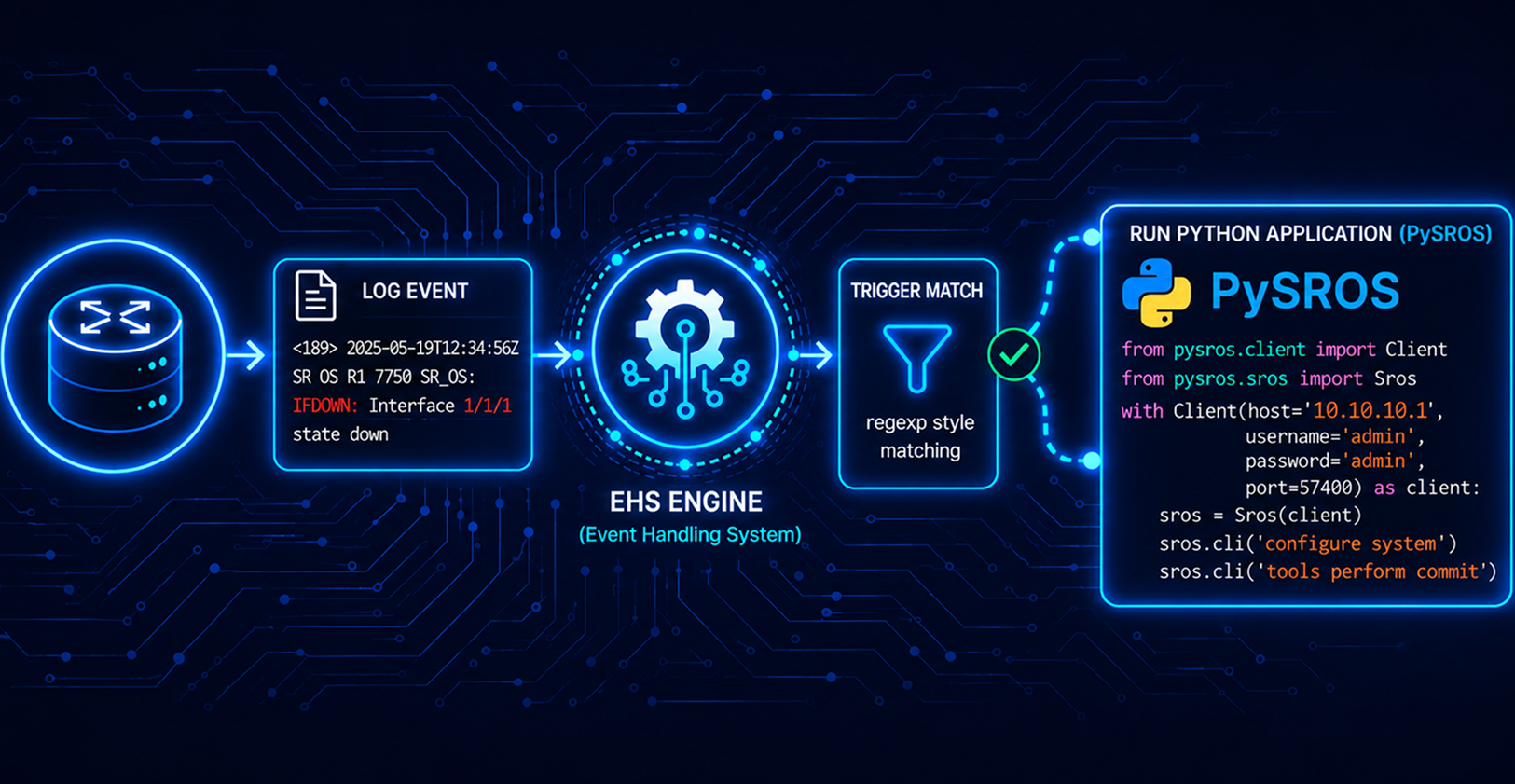
Event Handling System (EHS) on Nokia SR OS
Why MD-CLI Still Wins for On-Box Automation ?

Automating reactive tasks on a router, capturing diagnostics the moment something breaks, without waiting for a human to notice, is one of the most practical wins network automation offers. On Nokia SR OS, that capability lives in the Event Handling System (EHS). This article covers why EHS matters and what MD-CLI brings to the table when building EHS actions.
Event Handling System
The Event Handling System (EHS) is a framework that allows user-defined behavior to be configured on the router. EHS allows you to automate the router response to specific events. When a matching log event (trigger) occurs, EHS can run either a CLI script or a Python 3 application. You can use regular expressions to define flexible trigger conditions.

Basic EHS Object Handling (MD-CLI)
EHS configuration
You can configure complex rules to match log events as the trigger for EHS. When a log event is generated in SR OS, it is subject to being discarded if suppression and throttling are configured, before it is evaluated as a trigger for EHS, according to the following
EHS does not trigger on log events that are suppressed through the configuration.
EHS does not trigger on log events throttled by the logger
When using model-driven configuration mode and the MD-CLI, EHS can trigger a Python application that is executed inside a Python interpreter running on SR OS.
Python applications are not supported in classic configuration mode or mixed configuration mode.
When developing an EHS Python application, the event attributes are passed to the application using the get_event function in the pysros.ehs module
EHS debounce
EHS debounce (also called dampening) is the ability to trigger an action (for example, an EHS script) if an event happens (N) times within a specific time window (S)
For example, when linkDown occurs N times in S seconds, an EHS script is triggered to shut down the port.
Executing EHS
The execution of EHS scripts depends on the CLI engine associated with the configuration mode. The EHS script execution engine is based on the configured primary CLI engine.
Use the following command to configure the primary CLI engine.
/configure system management-interface cli cli-engine [md-cli]
Why Is EHS Required?
Traditional monitoring relies on polling. A system checks the router at regular intervals and responds only when it detects a problem.
This delay can cause important diagnostic information to be missed. For example, a flapping card, temporary hardware fault, or brief control-plane issue may recover before the next poll, leaving little or no evidence of what happened.
EHS closes this gap by reacting directly to the router’s internal events and logs as soon as a problem occurs.
Instead of checking the router every few minutes and hoping the evidence is still available, EHS responds immediately when the event happens.
For example, if a line card fails, EHS can automatically generate a tech-support dump at that exact moment. This captures the system state during the failure, including process information, memory, and hardware details.
The key benefit of EHS is immediate, event-driven diagnostics.
The Core Advantages
Zero detection latency - the action fires as part of the same event pipeline that logs the failure, not on a follow-up poll.
No external dependency for the trigger - the router doesn't need a collector or NMS in the loop to notice something's wrong; the event system is native to SR OS
Consistent diagnostic capture - every occurrence of a defined event gets the same automated response, removing "did anyone remember to grab the tech-support before it got busy" from the equation.
Extensible beyond diagnostics - EHS isn't limited to capturing dumps; it can drive remediation actions, notifications, or config changes tied to specific log events
What Is MD-CLI?
MD-CLI (Model-Driven CLI) is SR OS's YANG-based command-line interface, introduced alongside the model-driven management stack that also powers NETCONF and gNMI on the platform. Unlike the legacy "classic" CLI, every command in MD-CLI maps to a structured YANG data node; configuration, state, and actions are all defined against the same schema the router exposes over its programmatic interfaces.
Practically, this means:
Structured, predictable command trees - command hierarchy mirrors the YANG model, so tab-completion and
pwc json-instance-pathreveal exactly how a command maps to the underlying data model.Consistency across interfaces - a config change made via MD-CLI, NETCONF, or gNMI converges on the same model, so there's no drift between "what the CLI shows" and "what an automation tool sees."
Why MD-CLI for EHS, Specifically?
This last point turned out to matter more than expected. While building an EHS workflow to auto-capture a tech-support dump on a cardFailure event, the initial approach used a pySROS python-script triggered on-box by EHS, calling admin tech-support via a pySROS management session.
That call failed outright:
SrosMgmtError: MINOR: MGMT_AGENT #2007: Operation failed - tech-support not supported from pySROS
This wasn't a syntax issue. The SR OS version I was testing on explicitly blocks tech-support generation from being invoked through the pySROS management agent, on-box, regardless of whether it's called via a structured action or the CLI passthrough. The same call worked without issue when run from an external pySROS session connecting into the router, which confirmed the restriction is specific to the on-box Python execution context, not the tech-support action itself.
The practical takeaway: for on-box, in-the-moment EHS actions, MD-CLI script execution is currently the more reliable path on this platform/release. Python-based EHS remains valuable for logic that needs conditionals, state, or external calls, but for firing built-in admin operations like tech-support, MD-CLI's direct execution model avoids a restriction that isn't obvious until you hit it in testing.
How do we configure it?
In this use case, we are demonstrating how a tech-support file can be collected if there is a cardFailure event
1. Create and store the CLI script file (CF/FTP/TFTP)
file
edit techdump.txt
/admin tech-support cf3:/test.txt
2. Create script: "configure system script-control script"
/configure system script-control script "techdump" owner "TiMOS CLI" description " Automatic techdumps "
/configure system script-control script "techdump" owner "TiMOS CLI" location "cf3:\techdump.txt"
/configure system script-control script "techdump" owner "TiMOS CLI" admin-state enable
3. Configure script-policy : “configure system script-control script-policy”
/configure system script-control script-policy "autodump" owner "TiMOS CLI" admin-state enable
/configure system script-control script-policy "autodump" owner "TiMOS CLI" results "cf3:\"
/configure system script-control script-policy "autodump" owner "TiMOS CLI" script name "techdump"
4. Configure log filter: “configure log filter"
/configure log filter "100" named-entry "1" action forward
/configure log filter "100" named-entry "1" match application eq logger
/configure log filter "100" named-entry "1" match event eq 2011
/configure log filter "100" named-entry "1" match subject eq "CardFailure"
5. Configure event-handler: “configure log event-handling handler”
/configure log event-handling handler "handler-1" admin-state enable
/configure log event-handling handler "handler-1" entry 1 admin-state enable
/configure log event-handling handler "handler-1" entry 1 script-policy name "autodump"
6. Configure event-trigger: “configure log event-trigger event”
/configure log event-trigger logger event tmnxTestEvent admin-state enable
/configure log event-trigger logger event tmnxTestEvent entry 10 filter "100"
/configure log event-trigger logger event tmnxTestEvent entry 10 handler "handler-1"
How it works
In this scenario, I'm going to simulate a Card Failure using a Test Log Event.
Test log event
The SR OS provides the tmnxTestEvent event with optional custom text. The test event can be generated with the perform log test-event command. The custom-text command in this context replaces the default message of the event.
Step 1 - Trigger the event
perform log test-event custom-text "CardFailure"
Step 2 - Check logs
This will indicate if the execution of the script is successful
Log 99 log-name 99
==================================================================
Description: Default System Log
Memory Log contents  [size=500   next event=216  (not wrapped)]

215 2026/08/11 03:31:49.231 UTC MAJOR: SYSTEM #2053 Base CLI 'exec'
"The CLI user initiated 'exec' operation to process the commands in the SROS CLI file cf3:\techdump.txt has completed with the result of success"

214 2026/08/11 03:31:37.373 UTC MAJOR: SYSTEM #2052 Base CLI 'exec'
"A CLI user has initiated an 'exec' operation to process the commands in the SROS CLI file cf3:\techdump.txt"

213 2026/08/11 03:31:37.372 UTC MINOR: SYSTEM #2069 Base EHS script
"Ehs handler:"handler-1" with the description: "" was invoked by the cli-user account "admin"."

212 2026/08/11 03:31:37.372 UTC INDETERMINATE: LOGGER #2011 Base Event Test
"CardFailure"
Step 3 - Check the run history
/show system script-control script-policy "autodump"

==================================================================
Script Run History Status Information
------------------------------------------------------------------
Script Run #4
------------------------------------------------------------------
Start time    : 2026/08/11 03:31:37  UTC
End time      : 2026/08/11 03:31:49  UTC
Elapsed time  : 0d 00:00:12             Lifetime      : 0d 00:00:00
State         : terminated              Run exit code : noError
Result time   : 2026/08/11 03:31:49  UTC
Keep history  : 0d 00:55:03
Error time    : never
Source file   : cf3:\techdump.txt
Results file  : cf3:\_20260811-033137-UTC.372706.out
Run exit      : Success
Error         : N/A
Application   : event-script            Auth. user ac*: admin
* indicates that the corresponding row element may have been truncated.
==================================================================
Step 4 - Output File
8/11/2026  03:31a              555368 test.txt
05/11/2026  02:36a             6203920 yang.tim
      72 File(s)               16235322 bytes.
      1 Dir(s)            249645916160 bytes free.
[/file "cf3:\"]
Conclusion
The Event Handling System gives Nokia SR OS the ability to react to log events on-box, in real time, closing the gap between a failure occurring and diagnostics being captured. MD-CLI is what makes those reactions dependable, as a native model-driven interface, CLI scripts under script-control execute built-in operations like admin tech-support directly and predictably, tied to the same event pipeline that logs the failure itself.
Together, EHS and MD-CLI turn reactive diagnostic capture from a manual, easily-missed step into something that happens automatically, consistently, every time the trigger condition occurs.