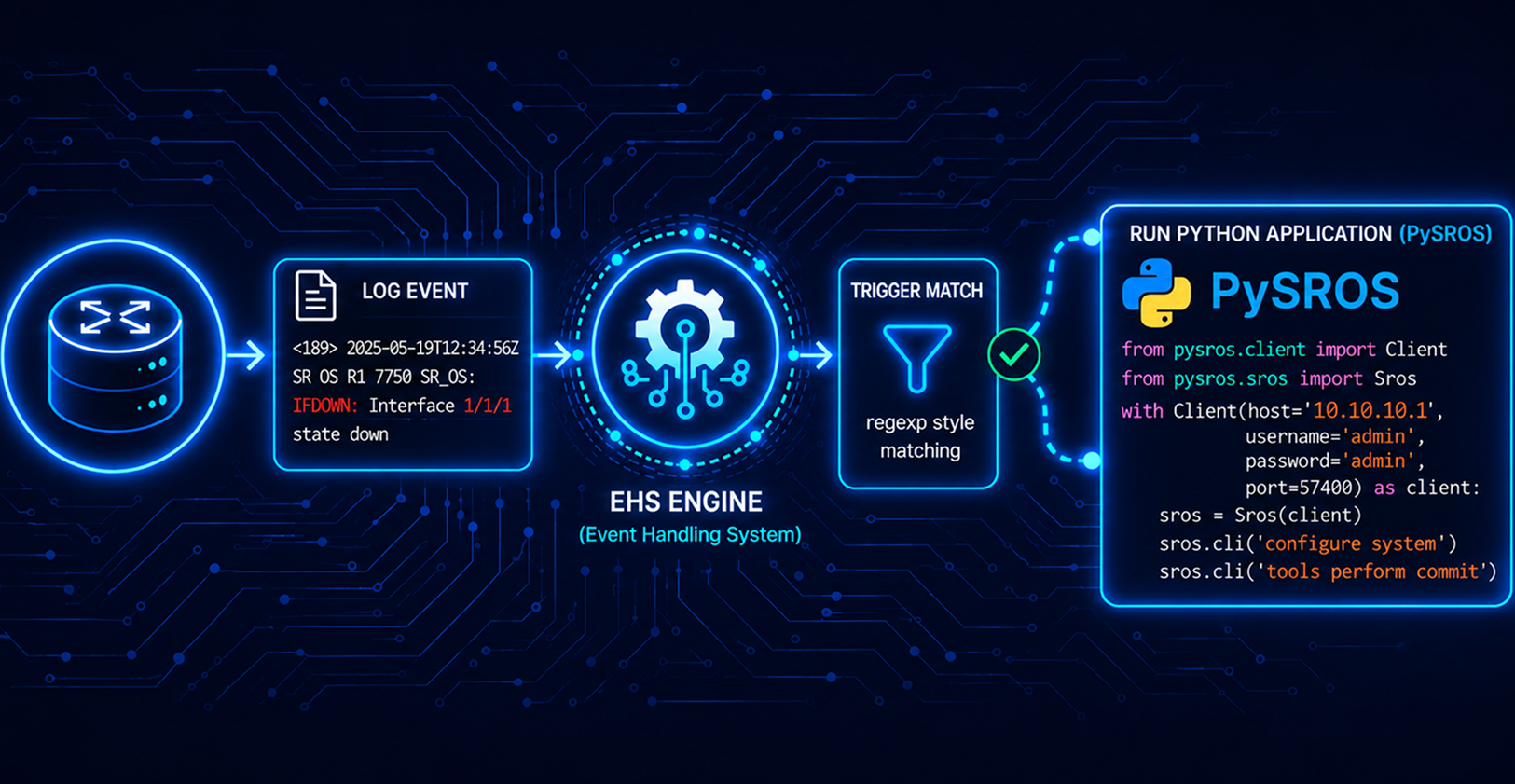
Event-Driven Network Automation with Nokia SR OS and Ansible EDA
Event-driven automation is redefining how networks respond to the unexpected. Here is what EDA is and why it is a game-changer.

The problem with Polling
Every network operations team is familiar with the scenario: a ticket arrives at 3 a.m. indicating a BGP session has been down for 45 minutes. The monitoring system, checking every five minutes, detected the issue on the third attempt and took an additional 10 minutes to alert someone. By the time it was addressed, the network had been compromised for nearly an hour.
This is the core issue with scheduled, polling-based automation. Problems are checked at fixed intervals, so if something fails between checks, the network remains compromised until the next cycle detects it.
Event-driven automation completely transforms this approach. Rather than periodically asking the infrastructure "are you OK?", the infrastructure immediately notifies you of any changes, triggering an instant response.
"Instead of asking the network if it's OK every five minutes, the network tells you the moment something changes — and a response fires in under a second."
Ansible Event-Driven Automation (EDA) is Red Hat's answer to this challenge built directly on top of the Ansible ecosystem most network teams already know. But it is not the first tool in this space. StackStorm has been doing event-driven automation since 2014.
Ansible EDA Explained
Ansible EDA was launched in 2022 and became generally available with Ansible Automation Platform 2.4 in 2023. It introduces a dedicated event-processing layer to the existing Ansible ecosystem, capable of simultaneously listening to numerous event sources and responding to them in real time.
The three core concepts are simple:
• Sources — where events come from: webhooks, Kafka topics, syslog streams, cloud alerts, Git commits, SNMP traps, monitoring system callbacks.
• Rules — conditions you define in YAML. If the event payload matches, an action fires. Rules can include throttling, grouping, and logical operators.
• Actions — what happens: run a playbook, post to Slack, open a ticket, set a variable, or simply log the event.
These are tied together in a Rulebook — a YAML file that looks like this:
---
- name: React to BGP session down
  hosts: network_devices
  sources:
    - ansible.eda.syslog:
        host: 0.0.0.0
        port: 5514

  rules:
    - name: BGP neighbor down
      condition: >
        event.message is search("bgpSessionDown", ignorecase=true)
      throttle:
        once_within: 60 seconds
        group_by_attributes:
          - event.host
      actions:
        - run_playbook:
            name: playbooks/bgp_remediate.yml
            extra_vars:
              source_host: "{{ event.host }}"
This forms the complete loop: source — condition — action. If you're familiar with Ansible, you already grasp 80% of EDA. The rulebook is the only new concept, and it reads like plain English.
What EDA is not
EDA is not a monitoring system; it doesn't generate events but responds to them. You still require a source, such as a syslog stream, a gNMI telemetry collector feeding Kafka, a Prometheus Alertmanager webhook, or a custom script. EDA serves as the reaction layer, not the observability layer. It is also not (yet) a fully stateful workflow engine. For long-running, multi-step orchestration with complex branching logic, Ansible Automation Platform's Workflows feature or a dedicated orchestrator is more suitable. EDA is optimized for quick, reactive, event-triggered automation.
Why EDA matters now ?
Networks Are Too Dynamic for Polling - Modern network environments—such as SD-WAN fabrics, containerized services, and cloud-native workloads—change states much faster than traditional infrastructure. A BGP session can fluctuate and recover in less than 30 seconds. An interface might experience a temporary optical issue and resolve itself. Polling-based tools capture the aftermath, not the event itself. EDA captures both.
Operator time is the bottleneck - The network operations talent gap is real and growing. Every alert that requires a human to log in, assess, and manually run a CLI command is wasted capacity. Closed-loop automation — where EDA detects an event, fires a playbook, and resolves the issue without paging anyone — frees operators to work on architecture, capacity, and projects instead of reactive fire-fighting
The Ansible Ecosystem Is Already There - This is EDA's single biggest advantage over purpose-built event-driven tools. If your team already has Ansible playbooks for network configuration, NETCONF-based remediation, or cloud provisioning, those playbooks work unchanged in EDA. There is no rewrite, no new DSL to learn, no separate execution engine to operate. The activation cost is dramatically lower than adopting an entirely new platform.
Kafka and gNMI Are Now Mainstream - Event-driven automation requires event streams. Coupler years ago, getting gNMI telemetry out of a network device and into an automation system was a niche skill. Today, gNMIc, Telegraf, and vendor-native streaming telemetry are standard practice. Kafka is ubiquitous. The infrastructure for event-driven automation is mature — EDA's role is to act on those streams, and it does so natively.
The Throttle and Group Model Solves the Alert Storm Problem - Anyone who has tried to build event-driven network automation before has hit the alert storm problem: one event generates hundreds of syslog messages, triggers hundreds of playbook runs simultaneously, and overwhelms both the automation system and the network device it is trying to fix. EDA's built-in throttle block —
once_within: 60 seconds,group_by_attributes: [event.host]— handles this correctly at the rulebook level, without requiring custom deduplication code.
EDA vs Alternatives
Ansible EDA is not the only event-driven automation tool available. StackStorm, Rundeck (now Process Automation) have all been in production environments for years. Each solves a slightly different problem. Here is an honest look at where each one excels and where it falls short.
Head-to-Head Comparison
| Feature | Ansible EDA | StackStorm | Rundeck |
|---|---|---|---|
| YAML-native config | Strong | partial | partial |
| Reuse existing automation | Strong | absent | partial |
| Kafka / streaming source | Strong | Strong | absent |
| syslog source built-in | Strong | partial | absent |
| gNMI / telemetry native | partial | partial | absent |
| NETCONF / nokia.sros support | Strong | partial | absent |
| Low learning curve | Strong | partial | partial |
| Production maturity | partial | Strong | Strong |
Choose Ansible EDA
• If your team already uses Ansible playbooks for any automation tasks
• If you need event-driven reactions to network syslog, gNMI, or webhooks
• Time-to-value matters — you want something running in hours, not weeks
• If your events come from Kafka, webhooks, or syslog streams
• If you are working with Nokia SR OS, Cisco, Arista, or Juniper via NETCONF
Ansible EDA meets Nokia SR OS
Overview
This guide provides a step-by-step guide for setting up Ansible Event-Driven Automation (EDA) with Nokia SR OS nodes running in Containerlab . By the end, you will have:
A Python virtual environment with Ansible EDA and the nokia.sros collection
SR OS nodes configured to stream syslog to EDA
EDA rulebook reacting to BGP session changes
NETCONF-based playbooks that automatically remediate those events on the SR OS nodes
Directory Structure
Create the working directory and subdirectories first:
mkdir -p sros-eda/{rulebooks,playbooks,inventory,logs}
cd sros-eda
Step 1 — Python Virtual Environment
Create an isolated environment so EDA dependencies do not conflict with system packages:
python3 -m venv venv
source venv/bin/activate
pip install --upgrade pip
Install Ansible EDA and its dependencies:
pip install ansible ansible-rulebook ansible-runner aiohttp ncclient
Install the required Ansible collections:
ansible-galaxy collection install ansible.eda
ansible-galaxy collection install nokia.sros
ansible-galaxy collection install ansible.netcommon
Verify everything installed correctly:
ansible-rulebook --version
ansible-galaxy collection list | grep -E "eda|sros|netcommon"
Step 2 — SR OS Node Configuration
Find your host IP first:
ip route get 8.8.8.8 | awk '{print $7; exit}'
Apply on SR OS nodes (replace <HOST_IP>):
/configure log syslog "eda" address <HOST_IP>
/configure log syslog "eda" severity warning
/configure log syslog "eda" port 5514
/configure log log-id "20" admin-state enable
/configure log log-id "20" description "EDA event stream"
/configure log log-id "20" source main true
/configure log log-id "20" destination syslog "eda"
Verify syslog is functioning
Start a listener on your host:
python3 -c "
import socket
s = socket.socket(socket.AF_INET, socket.SOCK_DGRAM)
s.bind(('0.0.0.0', 5514))
print('Listening on UDP 5514...')
while True:
    data, addr = s.recvfrom(1024)
    print(f'{addr[0]}: {data.decode()}')
"
Events from the SR OS node are being received:
Listening on UDP 5514...
172.20.20.13: <186>May 12 23:07:05 172.31.255.30 TMNX: 766 Base LOGGER-MAJOR-tmnxLogFileRollover-2008 [acct-log-id 9 file-id 19]:  Log file cf3:\act\act0919-20260512-223705.xml.gz on compact flash cf3 has been rolled over

172.20.20.13: <187>May 12 23:08:08 172.31.255.30 TMNX: 767 Base LOGGER-MINOR-tmnxLogFileDeleted-2009 [acct-log-id 9 file-id 19]:  Log file cf3:\act\act0919-20260512-200705.xml.gz on compact flash cf3 has been deleted

172.20.20.13: <187>May 12 23:08:08 172.31.255.30 TMNX: 768 Base LOGGER-MINOR-tmnxLogFileDeleted-2009 [acct-log-id 9 file-id 19]:  Log file cf3:\act\act0919-20260512-203705.xml.gz on compact flash cf3 has been deleted
Step 3 — Ansible Inventory
Create inventory/hosts.yml . This connects to SR OS via NETCONF using the nokia.sros.md network OS:
---
all:
  vars:
    ansible_user: <user-name>
    ansible_password: <password>
    ansible_connection: ansible.netcommon.netconf
    ansible_network_os: nokia.sros.md
    ansible_netconf_port: 830
    ansible_netconf_username: <user-name>
    ansible_netconf_password: <password>

  children:
    sros_nodes:
      hosts:

        sros1:
          ansible_host: 172.20.20.13
          ansible_netconf_host: 172.20.20.13
          bgp_neighbor: "10.10.10.2"
          bgp_peer_as: 65000

        sros2:
          ansible_host: 172.20.20.14
          ansible_netconf_host: 172.20.20.14
          bgp_neighbor: "10.10.10.1"
          bgp_peer_as: 65000
Step 4 — EDA Rulebooks
Rulebook 1 — BGP Events
---
- name: "SR OS EDA: BGP and Interface Event Handler"
  hosts: sros_nodes
  sources:
    - ansible.eda.syslog:
        host: 0.0.0.0
        port: 5514

  rules:

    - name: BGP session down
      condition: >
        event.message is search(
          "bgpBackwardTransNotification|bgpSessionDown|bgpPeerNotFound|ADMIN_SHUT|BGP-WARNING",
          ignorecase=true)
      throttle:
        once_within: 60 seconds
        group_by_attributes:
          - event.host
      actions:
        - run_playbook:
            name: playbooks/bgp_session_down.yml
            extra_vars:
              source_host: "{{ event.host }}"
              syslog_message: "{{ event.message }}"

    - name: BGP session up
      condition: >
        event.message is search(
          "bgpEstablishedNotification|ESTABLISHED",
          ignorecase=true)
      actions:
        - debug:
            msg: "BGP UP on {{ event.host }} — no action required"

    - name: Catch all — print every event received
      condition: event.message is defined
      actions:
        - debug:
            msg: "EVENT from {{ event.host }} | MSG: {{ event.message }}"
Step 5 — Playbooks
BGP Session down
---
- name: BGP Session Down — Remediate via NETCONF
  hosts: "{{ source_host | default('sros_nodes') }}"
  gather_facts: false

  tasks:

    - name: Collect BGP neighbor state via NETCONF
      netconf_get:
        filter: |
          <configure xmlns="urn:nokia.com:sros:ns:yang:sr:conf">
            <router>
              <bgp>
                <neighbor>
                  <ip-address/>
                  <admin-state/>
                </neighbor>
              </bgp>
            </router>
          </configure>
      register: bgp_state

    - name: Get current timestamp
      delegate_to: localhost
      command: date '+%Y-%m-%dT%H:%M:%S'
      register: timestamp

    - name: Log BGP down event
      delegate_to: localhost
      lineinfile:
        path: logs/bgp_events.log
        line: "[{{ timestamp.stdout }}] BGP DOWN on {{ inventory_hostname }} | {{ syslog_message | default('no message') }}"
        create: yes

    - name: Disable BGP neighbor
      ansible.netcommon.netconf_config:
        lock: never
        content: |
          <config xmlns="urn:ietf:params:xml:ns:netconf:base:1.0">
           <configure   xmlns="urn:nokia.com:sros:ns:yang:sr:conf">
             <router>
             <router-name>Base</router-name>
              <bgp>
                <neighbor>
                  <ip-address>{{ bgp_neighbor }}</ip-address>
                  <admin-state>disable</admin-state>
                </neighbor>
              </bgp>
             </router>
           </configure>
          </config>
      when: bgp_neighbor is defined
      ignore_errors: yes
      register: clear_result

    - name: Wait 3 seconds
      pause:
        seconds: 3

    - name: Enable BGP neighbor
      ansible.netcommon.netconf_config:
        lock: never
        content: |
          <config xmlns="urn:ietf:params:xml:ns:netconf:base:1.0">
           <configure   xmlns="urn:nokia.com:sros:ns:yang:sr:conf">
             <router>
             <router-name>Base</router-name>
              <bgp>
                <neighbor>
                  <ip-address>{{ bgp_neighbor }}</ip-address>
                  <admin-state>enable</admin-state>
                </neighbor>
              </bgp>
             </router>
           </configure>
          </config>
      when: bgp_neighbor is defined
      ignore_errors: yes
      register: clear_result

    - name: Wait for BGP to re-establish
      pause:
        seconds: 15

    - name: Log remediation result
      delegate_to: localhost
      lineinfile:
        path: logs/bgp_events.log
        line: "[{{ timestamp.stdout }}] BGP REMEDIATION COMPLETE on {{ inventory_hostname }} | neighbor {{ bgp_neighbor | default('unknown') }}"
        create: yes
Step 6 — Running EDA
Terminal 1 — Start EDA
cd sros-eda
source venv/bin/activate

ansible-rulebook \
--rulebook rulebooks/01_bgp_and_interface.yml \
--inventory inventory/hosts.yml \
--verbose
EDA starts and listens on 0.0.0.0:5514. It is now waiting for syslog events from your SR OS nodes.
Output :
(venv) [kleburu@devplayground]$ ansible-rulebook   --rulebook rulebooks/01_bgp_and_interface.yml   --inventory inventory/hosts.yml --verbose
2026-05-13 12:05:43,531 - ansible_rulebook.app - INFO - Starting sources
2026-05-13 12:05:43,531 - ansible_rulebook.app - INFO - Starting rules
2026-05-13 12:05:43,532 - drools.ruleset - INFO - Using jar: /labs/kleburu/python-projects/Ansible_Automation/sros-eda/venv/lib/python3.9/site-packages/drools/jars/drools-ansible-rulebook-integration-runtime-1.0.11-SNAPSHOT.jar
2026-05-13 12:05:44 171 [main] INFO org.drools.ansible.rulebook.integration.api.rulesengine.MemoryMonitorUtil - Memory occupation threshold set to 90%
2026-05-13 12:05:44 172 [main] INFO org.drools.ansible.rulebook.integration.api.rulesengine.MemoryMonitorUtil - Memory check event count threshold set to 64
2026-05-13 12:05:44 172 [main] INFO org.drools.ansible.rulebook.integration.api.rulesengine.MemoryMonitorUtil - Exit above memory occupation threshold set to false
2026-05-13 12:05:44 177 [main] INFO org.drools.ansible.rulebook.integration.api.rulesengine.AbstractRulesEvaluator - Start automatic pseudo clock with a tick every 100 milliseconds
2026-05-13 12:05:44,199 - ansible_rulebook.engine - INFO - load source ansible.eda.syslog
2026-05-13 12:05:44,201 - ansible_rulebook.engine - INFO - loading source filter eda.builtin.insert_meta_info
Syslog listener started on 0.0.0.0:5514
2026-05-13 12:05:44,519 - ansible_rulebook.engine - INFO - Waiting for all ruleset tasks to end
2026-05-13 12:05:44,520 - ansible_rulebook.rule_set_runner - INFO - Waiting for actions on events from SR OS EDA: BGP and Interface Event Handler
2026-05-13 12:05:44,520 - ansible_rulebook.rule_set_runner - INFO - Waiting for events, ruleset: SR OS EDA: BGP and Interface Event Handler
2026-05-13 12:05:44 520 [drools-async-evaluator-thread] INFO org.drools.ansible.rulebook.integration.api.io.RuleExecutorChannel - Async channel connected
Terminal 2 — Test BGP event
On the SR OS node:
/configure router bgp neighbor 10.10.10.2 admin-state disable
commit
EDA catches the syslog within 1-2 seconds and fires bgp_session_down.yml. Re-enable after the test:
Output:
PLAY [BGP Session Down — Remediate via NETCONF] ********************************

TASK [Collect BGP neighbor state via NETCONF] **********************************
ok: [sros1]

TASK [Get current timestamp] ***************************************************
changed: [sros1 -> localhost]

TASK [Log BGP down event] ******************************************************
changed: [sros1 -> localhost]

TASK [Disable BGP neighbor] ****************************************************
ok: [sros1]

TASK [Wait 3 seconds] **********************************************************
Pausing for 3 seconds
(ctrl+C then 'C' = continue early, ctrl+C then 'A' = abort)
ok: [sros1]

TASK [Enable BGP neighbor] *****************************************************
changed: [sros1]

TASK [Wait for BGP to re-establish] ********************************************
Pausing for 15 seconds
(ctrl+C then 'C' = continue early, ctrl+C then 'A' = abort)
ok: [sros1]

TASK [Log remediation result] **************************************************
changed: [sros1 -> localhost]

PLAY RECAP *********************************************************************
sros1                      : ok=8    changed=4    unreachable=0    failed=0    skipped=0    rescued=0    ignored=0
Quick Reference
| Command | Purpose |
|---|---|
| source venv/bin/activate | Activate the virtual environment |
| ansible-rulebook \ --rulebook rulebooks/01_bgp_and_interface.yml \ --inventory inventory/hosts.yml \ --verbose | start EDA |
| tail -f logs/bgp_events.log | Watch BGP event log |
| show log syslog "name" | Verify syslog log-id on SR OS |
| show system netconf | Verify NETCONF on SR OS |
| show router bgp summary | Check BGP state on SR OS |
The Bottom Line
Event-driven automation is not optional anymore. Networks are highly dynamic, operators are limited, and the delay between events and responses is too expensive to rely on reactive, manual processes.
Ansible EDA secures its position in this landscape not due to its power, but because of its accessibility. For the vast majority of network automation teams that already have Ansible in their environment, EDA is the shortest path from a polling-based world to a truly event-driven one.
Start with syslog. React to BGP events and interface flaps. Watch a playbook fire in under two seconds after a real network event. Then ask yourself what else you want to connect to it. The answer is usually: everything.
Further readings
Ansible EDA Documentation: ansible.readthedocs.io/projects/rulebook
ansible-rulebook on GitHub: github.com/ansible/ansible-rulebook
nokia.sros Ansible Collection: galaxy.ansible.com/nokia/sros