Automate Nokia SR OS with pySROS: A Practical Deep Dive
How Nokia's model-driven Python library lets you write one script that runs both on your laptop and directly inside the router — and why that changes everything for network automation.

What is pySROS and why does it matter?
Managing Nokia SR OS routers, such as the 7750 SR, 7450 ESS, 7210 SAS and the rest of the family, has typically involved dealing with CLI automation through Netmiko or creating a custom NETCONF client. While both methods are functional, they have drawbacks: screen-scraping CLI output can fail with software updates, and manually crafting NETCONF XML payloads is cumbersome and prone to errors.
pySROS is Nokia's answer: pySROS libraries provide a model-driven management interface for Python developers to integrate with supported Nokia routers running the Service Router Operating System (SR OS). The libraries provide an Application Programming Interface (API) for developers to create applications that can interact with Nokia SR OS devices, whether those applications are executed from a development machine, a remote server, or directly on the router
| FEATURE | DESCRIPTION |
|---|---|
| Model-driven | Full YANG schema awareness — Nokia native and OpenConfig modules |
| Write once, run anywhere | Same script on your laptop or directly on the SR OS node |
| NETCONF transport | Remote execution uses NETCONF/SSH; full config and state access |
| On-box MicroPython | SR OS ships a MicroPython interpreter for on-device automation |
| OpenConfig support | Works with OpenConfig YANG for multi-vendor normalisation |
YANG Modeling
YANG is a language that is designed to be readable by both humans and machines in order to model configuration and state information. YANG is rapidly becoming the standard way to model network devices and network device information. YANG is defined in the following RFCs:
RFC 6020 - YANG - A Data Modelling Language for the Network Configuration Protocol (NETCONF)
RFC 6021 - Common YANG Data Types
RFC 7950 - The YANG 1.1 Data Modelling Language
Model paths
At the core of the pySROS libraries are Nokia's model-driven management concepts built into SR OS. Communication between applications developed with pySROS libraries and Nokia SR OS routers is facilitated through model-driven paths that reference elements within the Service Router Operating System. The pySROS libraries use modeled paths in the JSON instance path format, which describes the referenced YANG models, including all YANG lists, list keys, and their values (though these may sometimes be omitted).
To obtain the JSON instance path directly from an SR OS router running software from release 21.7.R1, enter pwc json-instance-path in the MD-CLI within the relevant context.
SR OS pwc json-instance-path output from service configuration
(gl)[/configure service vprn "10" bgp-ipvpn mpls]
A:admin@R1# pwc json-instance-path
Present Working Context: /nokia-conf:configure/service/vprn[service-name="10"]/bgp-ipvpn/mpls
SR OS pwc json-instance-path output from BGP State
(gl)[/state router "Base" bgp neighbor "10.10.10.4"]
A:admin@R1# pwc json-instance-path
Present Working Context: /nokia-state:state/router[router-name="Base"]/bgp/neighbor[ip-address="10.10.10.4"]
Prerequisites and Installation
To use the pySROS libraries, the following pre-requisites must be met:
one or more SR OS nodes running in model-driven management interface configuration mode
Running SR OS 21.7.R1 or greater (to execute applications on the SR OS device)
With NETCONF enabled and accessible by an authorized user (to execute applications remotely)
Python 3 interpreter of version 3.6 or newer when using the pySROS libraries to execute applications remotely
#Create and activate a virtual environment
python3 -m venv env
source env/bin/activate

#Install pySROS from PyPI
pip install pysros
pip install --upgrade pysros

#Or clone from GitHub
git clone https://github.com/nokia/pysros
python3 setup.py install
Architecture
On-box vs Off-box execution
pySROS supports two distinct execution modes. Understanding the trade-offs is the first design decision for any automation project.
Off-box: [Python script] ──── NETCONF/SSH ────▶ [SR OS node]
        dev machine / automation server          7750 SR / 7250 IXR

On-box: [SR OS node] ▶ [pyexec /cron /EHS/alias] ▶ [pySROS script]
                                               MicroPython Interpreter
Off-box execution gives you several advantages to name a few: the ability to interact with multiple routers from a single script, executing scripts with a large data set, no impact on CPU / memory, Easier integration with other systems and the most important one is Access to richer Python ecosystem (Prometheus, Grafana, NetBox, Streamlit, etc.)
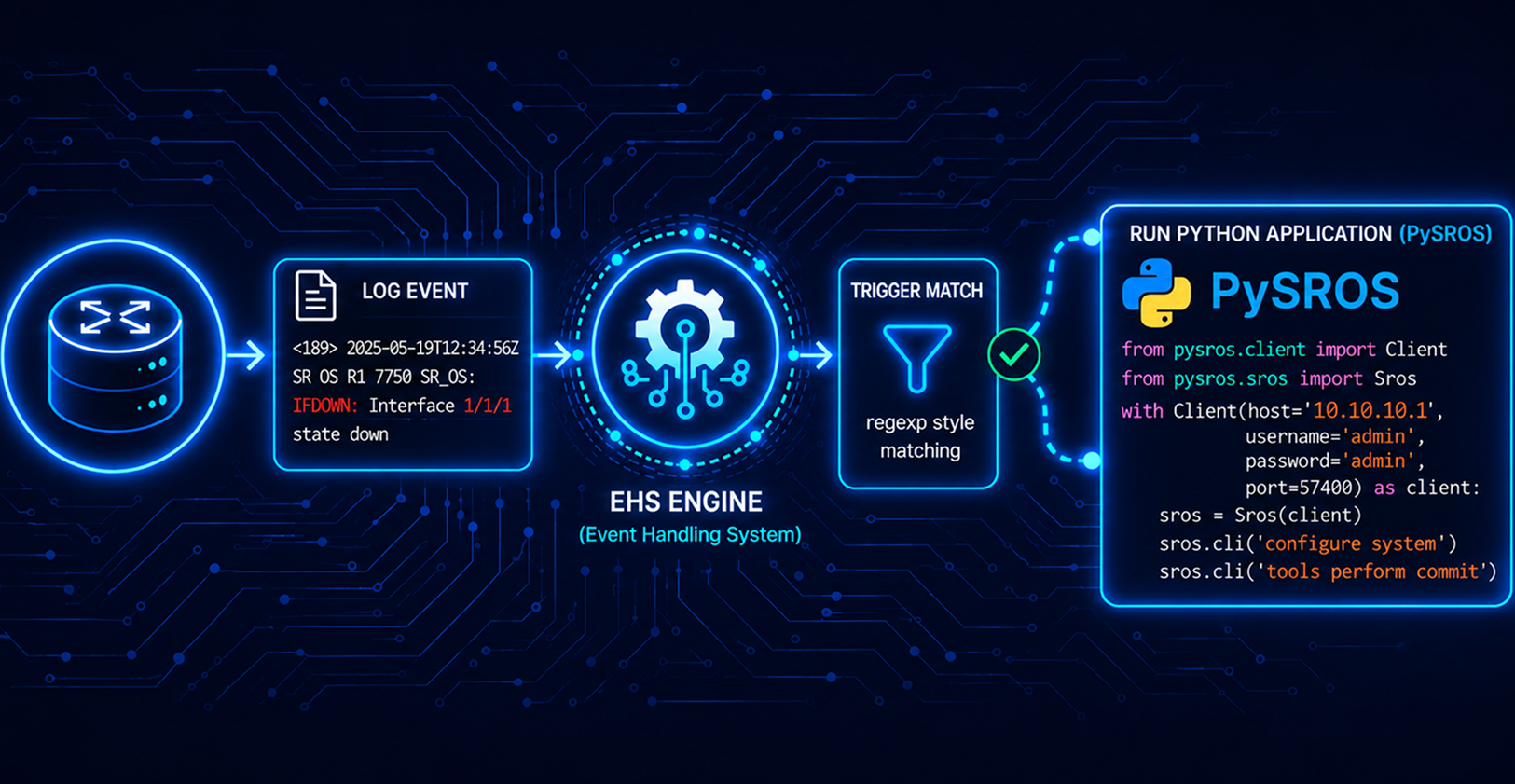
On-box execution runs inside the router itself via MicroPython — a lean Python 3 implementation designed for constrained environments. Execution time and memory usage are bounded by SR OS to protect routing stability. You can only address the local device and and the script can be triggered via CLI command aliases, EHS event handlers, cron jobs, or the pyexec command.
configure python context. The pyexec command takes a parameter, the name of a Python application from the SR OS configuration configure>python>python-script>application_name or the URL to the location (local/remote) of a Python applicationGetting Started
Lab Setup
We continue using the lab setup we built for our multivendor environment, and this is made possible by Containerlab

Our lab consists of the below components:
Servers:
Rocky Linux 9.6
Python 3.9
pySROS 23.3.3
Network Devices:
- Nokia SR OS 24.10.R5
Making a connection
To access the model-driven interface of SR OS while running a Python application from a remote workstation, use the pysros.management.connect() method. When executing a Python application on SR OS, the same method is used, but its arguments are ignored
File : connect.py
from pysros.management import connect
from pysros.exceptions import *
import sys


def get_connection():
    try: connection_object = connect(host="<host-ip>",
                                     username="username",
                                     password="password")

    except RuntimeError as error1:
        print("Failed to connect.  Error:", error1)
        sys.exit(-1)
    except ModelProcessingError as error2:
        print("Failed to create model-driven schema.  Error:", error2)
        sys.exit(-2)

if __name__ == "__main__":
    connection_object = get_connection()
    print("\n Connection established successfully \n")
Expected Output
Connection established successfully
Compliance Tool
The compliance script (compliance.py) connects to an SR OS router to validate its configuration against a predefined golden template, which consists of YANG model paths and their expected values.
For each check, it calls c.running.get(path) and compares the returned .data value against the expected string. If the path doesn't exist or the value doesn't match, it's recorded as a violation. At the end it prints a report showing passed vs failed checks, with the full YANG path, expected value, and actual value for each violation.
File : compliance.py
from pysros.management import connect
import sys
import datetime

GOLDEN_CHECKS = [
    # Security baseline
    (
        "/nokia-conf:configure/system/login-control/pre-login   message/message",
        "Authorized access only. All activity is monitored."
    ),
    (
        "/nokia-conf:configure/system/security/telnet-server",
        "False"
    ),
    (
        "/nokia-conf:configure/system/security/ftp-server",
        "True"
    ),

    # NTP must be enabled — correct path is under system/time/ntp
    (
        "/nokia-conf:configure/system/time/ntp/admin-state",
        "enable"
    ),
    # Router-id must exist (we just check presence, not value)
    (
        "/nokia-conf:configure/router[router-name='Base']/router-id",
        None
    ),
    # SNMP community must exist
    (
        "/nokia-conf:configure/system/security/snmp",
        None
    ),
    #  ISIS should be enabled
    (
        "/nokia-conf:configure/router[router-name='Base']/isis[isis-instance='0']/admin-state",
        "enable"
    ),
]

def check_compliance(c, checks):

    violations = []
    passed = 0

    for path, expected in checks:
        try:
            val = c.running.get(path)
            actual = val.data if hasattr(val, "data") else str(val)

            if expected is not None and str(actual) != str(expected):
                violations.append((path, expected, actual))
            else:
                passed += 1

        except Exception:
            violations.append((path, expected, "MISSING"))

        return violations, passed

def print_report(violations, passed, total):

    ts = datetime.datetime.utcnow().strftime("%Y-%m-%d %H:%M:%S UTC")
    print()
    print("=" * 70)
    print(f"  Nokia SR OS Config Compliance Report")
    print(f"  Generated: {ts}")
    print("=" * 70)
    print(f"  Checks:  {total}  |  Passed: {passed}  |  Violations: {len(violations)}")
    print("=" * 70)

    if not violations:
        print()
        print("  [COMPLIANT]  All checks passed.")
        print()
        return

    print()
    print("  VIOLATIONS FOUND:")
    print()
    for i, (path, expected, actual) in enumerate(violations, 1):
        # Shorten very long paths for readability
        short_path = path.split("/")[-1] if "/" in path else path
        print(f"  [{i}] {short_path}")
        print(f"      Full path : {path}")
        print(f"      Expected  : {expected if expected is not None else '(must exist)'}")
        print(f"      Actual    : {actual}")
        print()

if __name__ == "__main__":
    c = connect(host="<host-name>" , username="username" , password="password")

    total = len(GOLDEN_CHECKS)
    violations, passed = check_compliance(c, GOLDEN_CHECKS)

    print_report(violations, passed, total)

    c.disconnect()
Expected Output
=============================================================
 Nokia SR OS Config Compliance
 Report Generated: 2026-03-23 02:22:26 UTC
=============================================================
 Checks: 7 | Passed: 6 | Violations: 1
=============================================================

 VIOLATIONS FOUND:
 [1] admin-state
     Full path : /nokia-conf:configure/system/time/ntp/admin-state
     Expected  : enable
     Actual    : disable
disabled on the router and a violation was found# Enabling NTP
[gl:/configure system time ntp]
A:admin@PE1# info json
{
"nokia-conf:admin-state": "enable"
}
# NTP was enabled and all checks passed with no violations
============================================================
Nokia SR OS Config Compliance
Report Generated: 2026-03-23 09:08:47 UTC
=============================================================
Checks: 7 | Passed: 7 | Violations: 0
=============================================================
CLI Command Alias
A command alias in SR OS lets you expose a pySROS script as a native MD-CLI command. From the operator's perspective they just type a short command — the Python execution is invisible.
How it works
The script lives on the router's compact flash. SR OS's MD-CLI alias config points at it, and when the operator runs the alias, SR OS invokes the Python script to execute. It's the cleanest way to give network operators custom show commands without requiring them to know Python or pySROS exists.
File : interfaceproto.py
Configuration
# Step 1 - Configure the python-script

[gl:/configure python python-script "interfaceproto"]
A:admin@PE1# info json
{
    "nokia-conf:admin-state": "enable",
    "nokia-conf:urls": ["cf3:\interfaceproto.py"],
    "nokia-conf:version": "python3"
}

# Step 2 - check the status of the Python Script
/show python python-script "interfaceproto"
============================================================
Python script "interfaceproto"
============================================================
Description : (Not Specified)
Admin state : inService
Oper state : inService
Oper state
(distributed) : inService
Version : python3
Action on fail: drop
Protection : none
Primary URL : cf3:\interfaceproto.py
Secondary URL : (Not Specified)
Tertiary URL : (Not Specified)
Active URL : primary
Run as user : (Not Specified)
Code size : 863
Last changed : 03/23/2026 09:23:04

# Step 3 - Configure the command alias and mount it

[gl:/configure system management-interface cli md-cli environment command-alias alias "intprotocol"]
info
admin-state enable
python-script "interfaceproto"
mount-point "/show" { }

# Step 4 - Sanity check the alias configured
A:admin@PE1# /show ?
Aliases: intprotocol - Command-alias

# Step 5 - Run the command protocols will be displayed for each interface
A:admin@PE1# /show intprotocol
=============================================================
 Router Base Interfaces
=============================================================
 Interface          Oper State IPv4 State IPv4 Address
 Protocols
-------------------------------------------------------------
 system             up          up        10.10.10.1
 isis mpls rsvp
 tocisco_xrv9000    up          up        192.168.1.1
 isis mpls rsvp ldp
 toPE2              up          up        192.169.1.1
 isis mpls rsvp ldp
 loop               dormant     down      N/A
=============================================================
Practical use cases
Bulk interface auditing — Iterate over all interfaces across a fleet, collect IP/admin/oper-state into a structured report.
EHS event-driven remediation — Trigger a pySROS script via EHS when a BGP session drops. Log context, attempt recovery, or notify an external system.
Custom MD-CLI aliases — Wrap a pySROS script as an MD-CLI alias. Operators run a natural command without knowing Python is underneath.
Scheduled config compliance — Run a pySROS script via SR OS cron hourly to validate config against a golden template and log deviations.
Multi-vendor OpenConfig normalisation — Use OpenConfig YANG modules on SR OS alongside other vendors for a unified config and state model.
Conclusion
pySROS represents a significant change in approaching Nokia SR OS automation. Traditionally, there has been operational friction between tasks performed from a management server and those executed on the router, involving different tools, credentials, failure modes, and duplicated logic. pySROS eliminates this divide by treating the execution context as a runtime detail rather than an architectural limitation.
| Resource | URL |
|---|---|
| pySROS official docs | Learn PySROS |
| pySROS GitHub (examples) | pySROS Git |
| SR OS YANG models | 7X50 Yang Model |
Comments
Join the discussionNo comments yet. Be the first to comment.